SSD vs HDD vs M.2 for gaming is a question every modern gamer should explore before building or upgrading a gaming PC. While hard drives were once the default, newer storage technologies have transformed the way games load, install, and perform. Understanding the difference between these three storage types is essential if you want smoother gameplay, shorter load times, and better overall performance.
What Is the Difference Between HDD, SSD, and M.2?
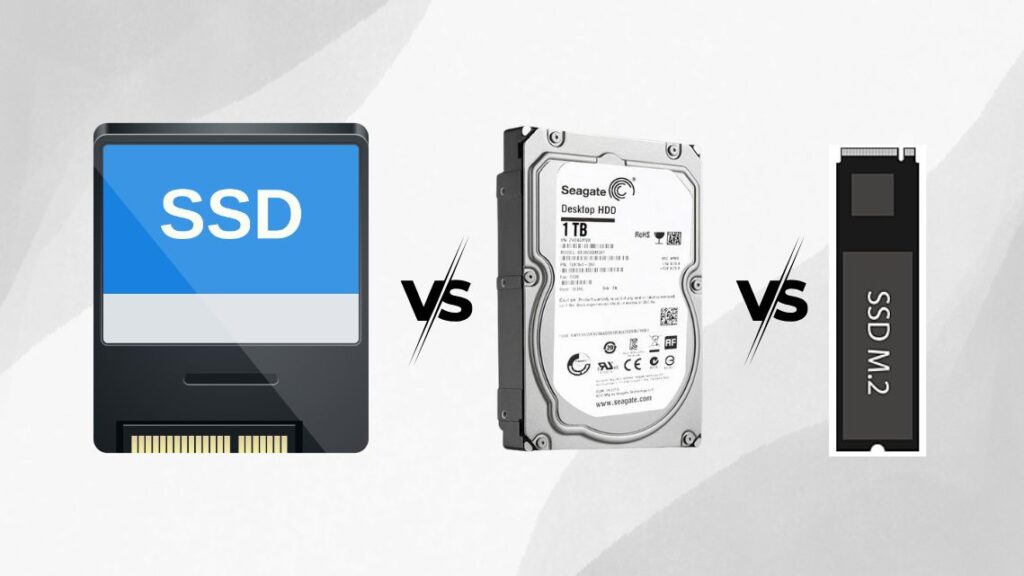
An HDD, or hard disk drive, uses spinning platters and mechanical arms to read and write data. They are the cheapest option and offer massive storage but are also the slowest.
A traditional SSD uses flash memory and has no moving parts. They are much faster than hard drives and more durable, especially for gaming workloads.
M.2 NVMe SSDs are the latest and fastest type of storage. They connect directly to the motherboard and use the PCIe interface, allowing insanely fast read and write speeds that can dramatically improve game load times and performance.
How They Impact Gaming Load Times
The time it takes for your game to launch, load levels, or switch between in-game menus is heavily dependent on storage speed. HDDs take the longest because of their mechanical nature. SATA SSDs are much faster, but M.2 NVMe drives can load some games in under five seconds.
At GeekzUP Repairs, we have tested the same game across all three types. For example, a game like Grand Theft Auto V takes over 70 seconds to load on HDD, around 30 seconds on a SATA SSD, and only 8 to 10 seconds on an M.2 NVMe SSD.
Game Installation and Updates
Another factor where storage speed matters is game installation and patching. Larger updates that are several gigabytes in size install significantly faster on an M.2 SSD. This means less waiting and more playing.
If you play online games with regular patches and expansions, using an M.2 drive can save hours over the lifespan of your PC. That is why we recommend them during our custom gaming PC build service.
Do M.2 Drives Affect FPS or Game Stability?
Storage type does not directly improve FPS, but it does affect how assets load in real-time. In open-world or texture-heavy games like Call of Duty or Cyberpunk, slower drives can cause texture pop-ins, freezes, or lag spikes.
M.2 SSDs allow your GPU and CPU to access game data much faster, which results in more consistent frame pacing and fewer stutters. While your average FPS remains the same, your actual gameplay experience becomes much smoother.
Storage and Price Comparison
| Storage Type | Average Speed | Price | Ideal Use |
|---|---|---|---|
| HDD | Slow (100 MB/s) | Cheapest | Mass storage |
| SATA SSD | Fast (500 MB/s) | Mid-range | Game storage |
| M.2 NVMe SSD | Very Fast (3000+ MB/s) | Premium | Boot drive, top-tier games |
While HDDs are still affordable and great for storing old games, videos, or backups, most gamers now go with dual-drive setups. A smaller M.2 SSD for the operating system and current games, and a secondary HDD for bulk storage.
We often design builds this way in our budget-friendly gaming PC builds.
What Should You Pick in 2025?
If you are serious about gaming, an M.2 SSD is the best choice. It not only reduces loading screens but also helps modern games perform the way they were intended. For casual gamers or tight budgets, a combination of SATA SSD and HDD still works. But if you want future-ready speed, M.2 is the way to go.
At GeekzUP Repairs, we help gamers find the right balance between budget and performance. Whether you’re upgrading your old build or building your first gaming PC, we offer tailored storage configurations based on your needs. You can contact us here or visit our store for a personalized consultation.