

Remote Support In Nashville, TN
Fix slow performance, viruses & errors from anywhere online.

Reliable Remote Support You Can Actually Trust
Many computer problems can be fixed without anyone leaving home. Over a secure remote session, GeekzUP technicians can resolve slow performance, remove viruses, fix registry errors, clean out resource-hogging programs, cure slow boot times, install software, and set up email, all for $100 per hour. All you need is a working internet connection.
Remote support is ideal for busy schedules, follow-up questions after a repair, and quick fixes that do not justify a trip. You watch everything we do on your screen in real time, and the session ends the moment we are done. If we discover the problem is hardware and needs the bench, we will tell you right away instead of billing hours online.
- Slow performance cleanup
- Virus and malware removal
- Software installation and setup
- Email setup and troubleshooting
- Printer setup over the network
- Registry errors and startup cleanup
- Pricing
- $100 / hr
- Warranty
- Parts & labor
- Rated
- 5.0 · 309+ reviews
- 110 Sanders Ferry Rd, Suite 11, Hendersonville, TN 37075
- Mon–Fri, 9 a.m.–6 p.m. · Sat, 10 a.m.–1 p.m. · Sun by appointment only
Signs It's Time For Remote Support
If any of these sound like your machine, bring it in. Addressing problems early almost always makes the fix cost-efficient.
Common Issues We Fix
Everything This Service Covers
Secure Remote Session
You approve the connection, watch everything live, and can end the session at any time.
Real Technician, Not A Script
The same GeekzUP techs who work our bench handle your remote session.
Billed By The Hour
$100 per hour with no travel fees, no minimum visit charge, and no surprise add-ons.
Honest Triage
If it turns out to be a hardware problem, we say so immediately and plan next steps.
After-Fix Checkup
We verify the fix took, and you know exactly what was changed.
Simple, Upfront Pricing
No surprises: you approve every price before work begins, and your diagnostic fee applies toward the repair.
Payment Made Easy
- Cash preferred, no processing fees
- CashApp, Venmo, Apple Pay & Zelle are fee-free
- Credit cards accepted (3.5% transaction fee)
- Every repair approved by you before work starts
Simple, Clear, Hassle-Free
No jargon, no surprise fees. Here's exactly what happens when you bring your device to GeekzUP.
Book Or Drop Off
Book online in seconds or walk in, no appointment needed for drop-offs.
Diagnosis
We find the real issue and explain your options in plain English.
Approve & We Fix
You approve the price up front, then we get to work.
Pickup Or Delivery
Grab it from the shop or we deliver it back to you, tested and ready.

Why Nashville Trusts GeekzUP With Their Tech
We've kept Middle Tennessee's devices running for 14+ years, 309+ five-star reviews and counting.
Veteran-Owned
Integrity and accountability on every job.
Warranty Backed
Parts and labor are covered.
Repair Timeline
We confirm expected timing after diagnosis.
Upfront Pricing
You approve every price first.
How A Remote Support Session Works
Call or book online, and we will schedule a time that suits you. At the appointment, we send you a link that opens a secure screen-sharing session, and you approve access before anything happens. You can watch every step live, ask questions as we go, and end the session at any moment. When the work is done, the connection closes and cannot be reopened without your approval.
Issues like slow performance, virus infections, registry errors, resource-hogging startup programs, and slow boot times respond very well to remote work. If you are outside Middle Tennessee, remote support is also the easiest way to work with us from anywhere.
Great For Seniors, Families And Small Businesses
Remote support shines when driving to a shop is a burden. Adult children book sessions for parents across town or across the country; small businesses use us as an on-call help desk without the cost of in-house IT; and existing customers use quick sessions for follow-up questions after a bench repair.
If the issue turns out to need hands-on service, everything we learned in the session carries over. You can drop the machine at our Hendersonville shop, or for networks and multi-device problems, book our on-site service at $125 per hour.
Connecting With Your Technician
Follow these steps to securely connect with a GeekzUP technician for remote computer support. The connection is encrypted and permission-based: nothing happens on your computer without your approval, and you can end access at any time.

Open The HelpWire Link
Click the secure HelpWire link sent to you by GeekzUP, or the download button above. The HelpWire client begins downloading automatically; when it finishes, open the downloaded file. If the download does not begin, use the download link shown on the HelpWire page.
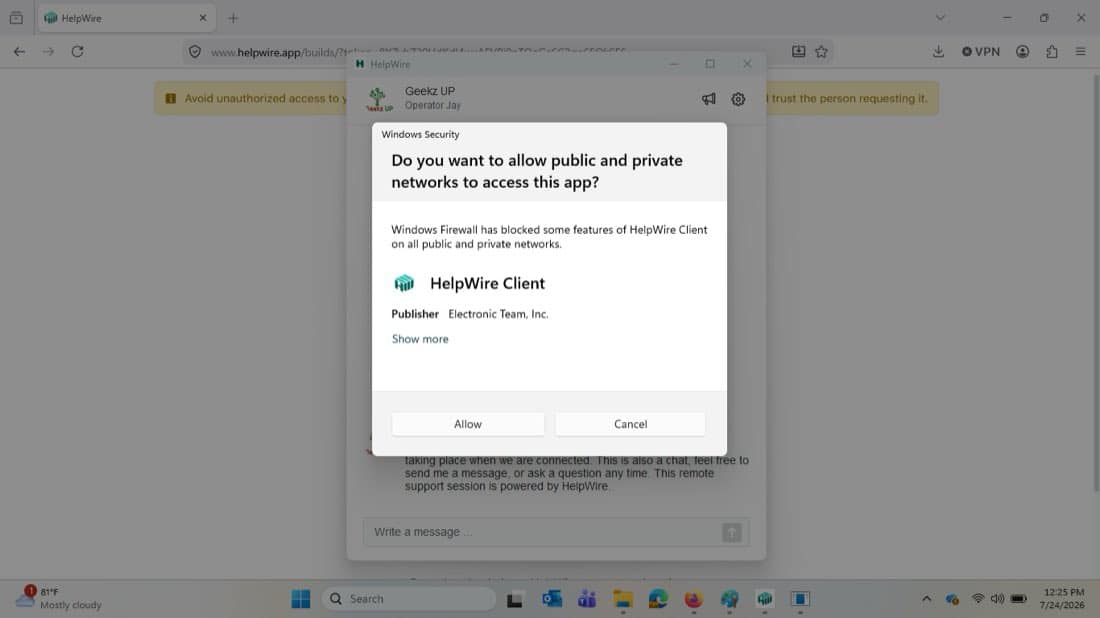
Allow HelpWire Through Windows Security
If Windows asks whether HelpWire Client may communicate on public and private networks, select Allow. This message may not appear on every computer.
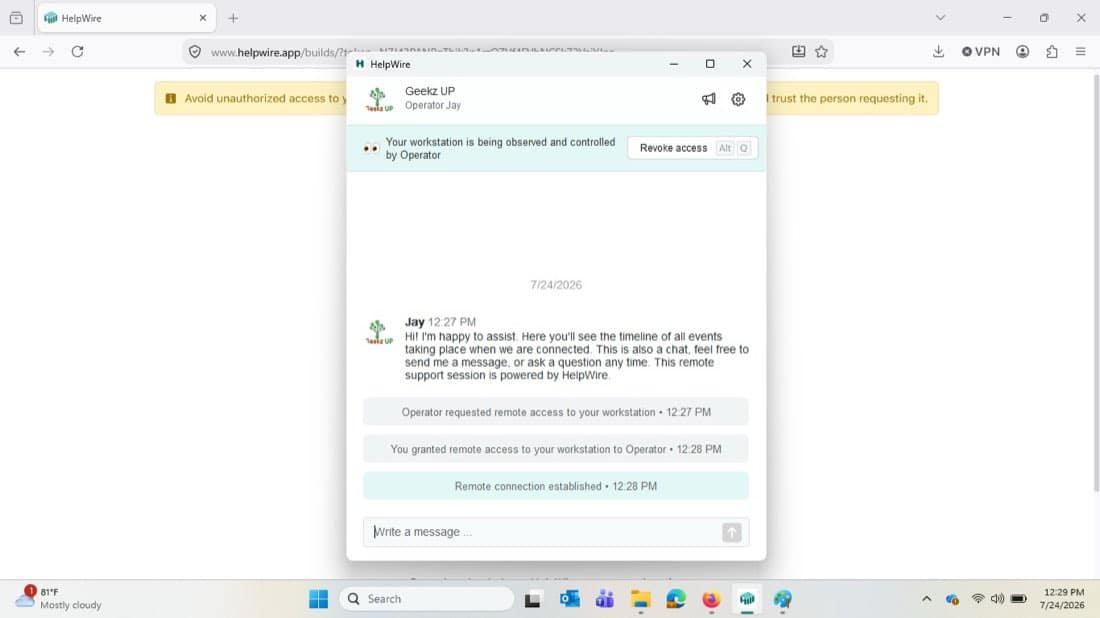
Grant Remote Access
After HelpWire opens, your GeekzUP technician will send a remote-access request. When the request appears, select Grant access; HelpWire confirms once the remote connection is established. Keep the HelpWire window open during the support session.
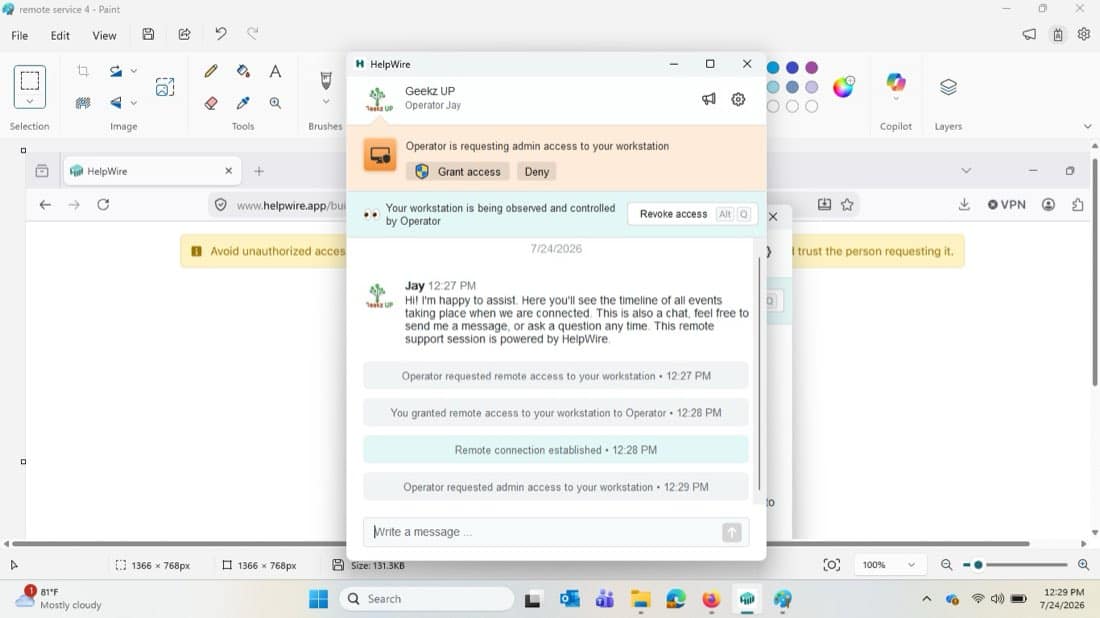
Approve Administrator Access When Requested
Some repairs require administrator permission. When HelpWire displays an admin-access request, select Grant access. If Windows shows an additional confirmation window, select Yes or Allow.
You are connected! Your technician can now begin the remote service. Use the HelpWire chat box to ask questions at any time. To end access, select Revoke access or simply close HelpWire.
Security reminder: only grant access when you are actively working with a GeekzUP technician at 615-387-9454 and recognize the technician name shown in HelpWire.
Related Services
Frequently Asked Questions
Yes. While many computer issues require in-person handling, problems like slow performance, viruses, registry errors, resource-hogging plugins, and slow boot times can be resolved through a remote tech support session, provided you have an internet connection.
Book Your Remote Support
Online software help for a working, connected device. We will confirm availability and send connection instructions. Do not install remote-access software or share codes until you verify that you are speaking with GeekzUP.
- Service
- 2Service Details
- 3Preferred Time
- 4Your Details
Tell Us What You Need Help With Online
Share only what is relevant to this service. Never include passwords or payment details.
Optional device or error photos. Hide passwords, account details and personal files. Up to six images, 8 MB each.